Descriptive Flexfields
All the Integrators available under the Product Definitions Module are able to dynamically create DFF columns during the new sheet creation based on the DFF configuration in Oracle Cloud. More information about the Descriptive Flexfields can be found here.
Item Relationship Descriptive Flexfield Context Limitation
The DFF Context LOV displays the seeded Context Code to help you choose the correct DFF Context for the Relationships you are uploading.
When using descriptive flexfields, ensure the DFF context is correctly aligned to the mode of your worksheet using the table below:
| Relationship Type | Context Code |
|---|---|
Related Items |
RELATED |
GTIN Items |
GTIN DFF |
Cross Reference Items |
XREF |
Spoke System Items |
SYS_DFF |
Trading Partner Items |
CUST_DFF |
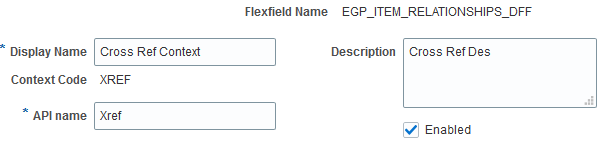
Oracle DFF Context setup as below:
Integrator data will show as below:
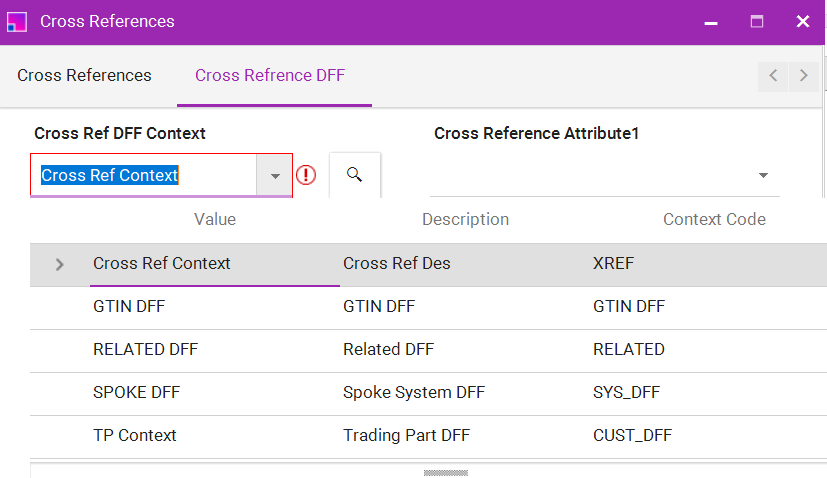
The limitation in the Integrator is that we are unable to restrict the list of values based on the right ‘Context Code’.
When wrong context is selected the error message will be shown as below:

Trading Partner Item and Relationships Descriptive flexfields
When defining descriptive flexfields associated with trading partner items, you must use certain prefixes when naming the context segments, in order for the segments to be displayed for the respective trading partner type. For example, if you define a trading partner item descriptive flexfield with a context segment named COMP_TPI_ATTRIBUTES, then the value segments of this context will be displayed for Competitor Item when users conduct transactions in that context.
The prefixes required for naming the context segments are listed in the following table
| Trading Partner Type | Prefix for context Segment |
|---|---|
Competitor Item |
COMP |
Customer Item |
CUST |
Manufacturer Item |
MFG |
Supplier Item |
SUPP |