Verify User
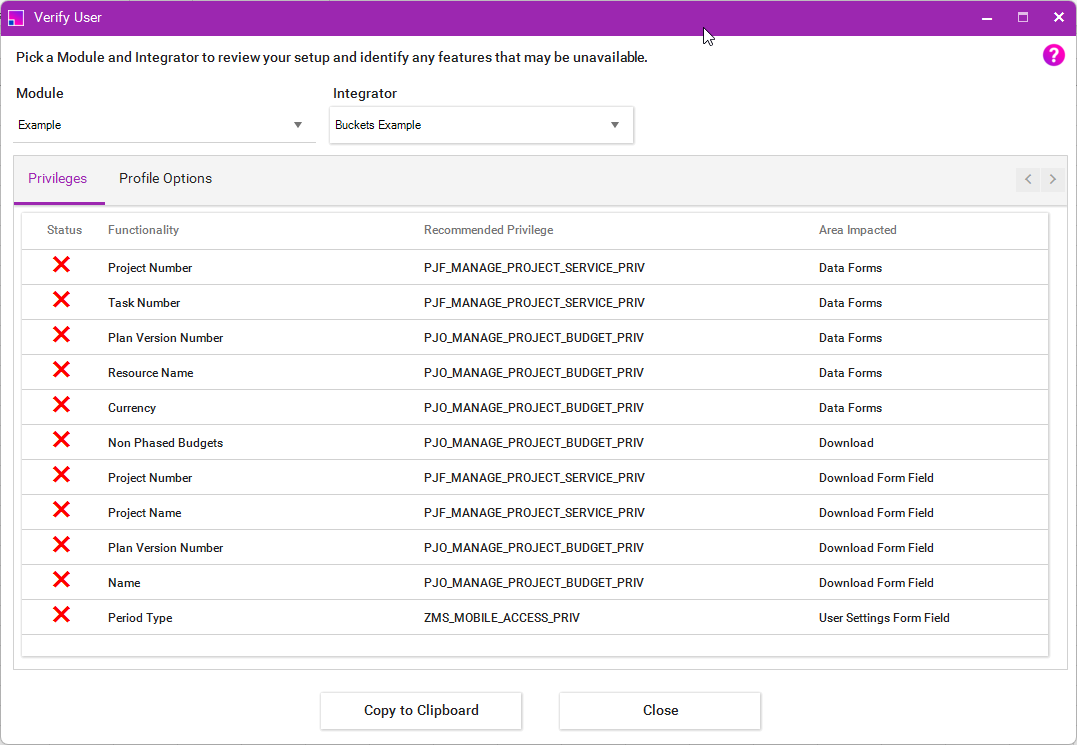
In the Add-in Ribbon under the Help menu, you can use the Verify User form to assess your access. Determining if you have the sufficient permissions to use the Module Integrators and in addition the Profile Options that are set or not set against your user.
Analysing the Results
From selecting your Module and Integrator, the form will run and output a report for any access issues from missing privileges or configured profiles.
Privileges
Entries shown in the form indicate where you are missing permissions to use functionality in the Integrator you have selected. More4apps has provided a recommended privilege for each function in the tool.
| Where a privilege is duplicated this is due to multiple functionalities being controlled by the same privilege. |
Profile Options
The page will show the status of the profiles in relation to the logged in user. Currently there are three types of profiles:
| Profile Option | Value | Description |
|---|---|---|
Create and Edit Templates |
✔ |
You have the ability to Create and Edit Sheets |
✘ |
Your user doesn’t have access to Create or Edit sheets. |
|
Integrator Restrictions |
✔ |
Your user has access to the indicated Integrator. |
✘ |
Your user has been restricted and cannot access the Integrator. |
|
Download Profiles |
✔ |
You have access to download using the Integrator |
✘ |
The Profile does not exist or has not been set, you will not be able to perform the downloads indicated. |