Create Price Lists
To create a new Price List, the Upload Action must be 'Create' or 'Create records' in the header and/or the relevant sections. Refer to Upload Actions for more information about how they work.
Header
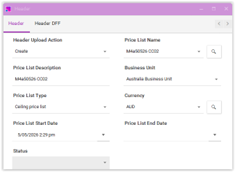
Enter the relevant data directly into the sheet or use the data form.
Note that the Price List name is a mandatory field and must be unique.

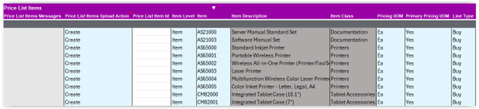
Price List Items
Add item details in the Price List Items section. Ensure that items are assigned to the Item Validation Organization associated with the Business Unit.
Service Duration Period and Service Duration attributes are enterable when defining the pricing for Service Items.
Charges
Define pricing details and charges.
Note that Price Periodicity is required when Price Type is 'Recurring'.
If the Price Calculation Method is 'Cost', Calculation Type and Calculation Amount require values to be entered.

Access Sets
A price list typically requires at least one Access Set to be defined before it can be successfully activated. The parent record for the Access Set is the Header section. The Access Set must align with the header to prevent it from being an orphaned record.

Approve Price Lists
By default, new price lists are created with the status of 'In progress'. To approve the price lists, use the 'Update' action to set the Approval Status to 'Approved'. As the approval relies on the Header record, ensure the approval is aligned with the Price List Name.

Important Note: This approval process does not apply where an approval workflow is enabled.