Limitations
The following is a list of known limitations in the Sales Orders Integrator:
Additional Information (EFFs)
Additional Information against Sales Orders cannot be downloaded or updated in the current version of the Integrator. Please get in touch with More4apps if this is a desirable feature.
Also, if Additional Information already exists against the Header or Lines and you attempt to create the same EFFs again, the web service will ignore the new values. No error message is returned in this scenario. Contact More4apps for assistance with raising the Service Request for this issue, if required.
Upload Lines Limit
When uploading Sales Order Lines, the Integrator uses a nested web service structure. Due to this design, uploads containing more than approximately 400 lines may result in a timeout.
If a timeout occurs:
-
The Sales Order Lines may still be successfully created in Oracle.
-
However, the Integrator may return a timeout error message due to the volume of data being processed.
To minimize the risk of timeouts, it is recommended to:
-
Limit the number of lines per upload.
-
Break large Sales Orders into smaller batches where possible.
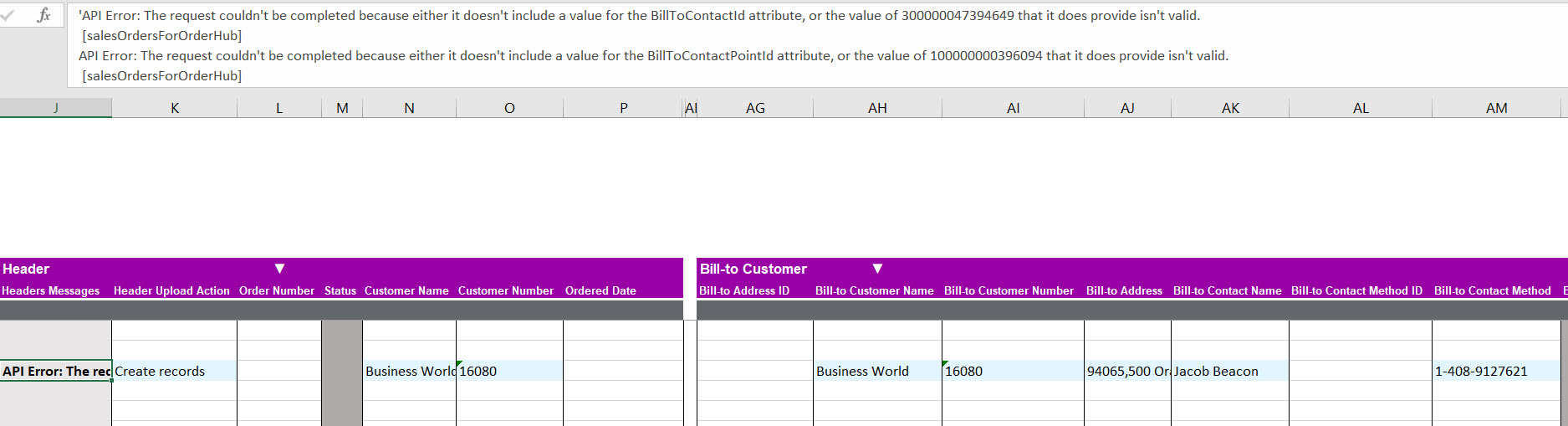
API error for Bill-to and Ship-to Customer Contact Method
An error may occur when creating or updating a Sales Order if the Bill-to or Ship-to Customer contact method is invalid, duplicated, or corrupted in Oracle.
The web service validates contact methods during processing and may return an error if the customer record is not correctly configured.
Ensure the customer contact setup is valid and does not contain duplicate entries. If the issue persists, a Service Request (SR) may need to be logged with Oracle. Contact More4apps for assistance if required.
Resolving Pricing API Error FOM-4515095
Overview
This guide provides instructions on how to resolve the API error FOM-4515095. Users typically encounter this error when attempting to add a new order line to an existing Draft Sales Order using the More4Apps Sales Orders Integrator. The upload may fail with this error even if the item being added already exists on the same order and was successfully priced on previous lines. The error message typically indicates that Order Management cannot price the sales order because it cannot identify a charge for the item.
Root Cause
The error occurs due to a configuration mismatch between Oracle’s expected pricing behavior and the integrator’s design.
-
When the Oracle parameter for the source order system is set to "Yes", Oracle does not price the order during import and instead expects the import payload to already contain the charge details.
-
The More4Apps Sales Orders Integrator is designed to send the order header and lines and let Fusion Pricing derive the charges from the customer’s price list.
-
Because the integrator does not send charge details, Fusion will reject the import if it expects the source system to supply the prices.
Resolution Steps
To resolve this issue, you must configure Oracle to derive the price rather than expecting the integrator to provide it.
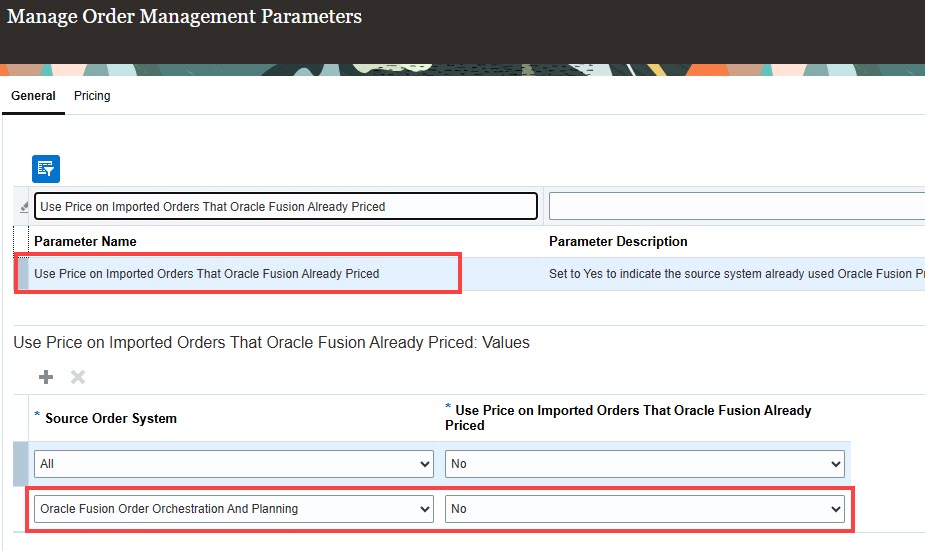
Step 1: Update Oracle Order Management Parameters
-
Navigate to Setup and Maintenance > Search > Manage Order Management Parameters
-
Parameter Name = Use Price on Imported Orders That Oracle Fusion Already Priced
-
Add a new line for the Source Order System.
-
Select the Source system "Oracle Fusion Order Orchestration And Planning".
-
Set the value for this parameter to "No".
-
Save the changes to the parameters.
Step 2: Update Order Creation Settings in More4Apps
-
During the order creation step, locate the freeze pricing options.
-
Ensure that the "Freeze Price" flag is set to "No" on the order header.
-
Providing "Freeze Price = No" ensures that the integrator relies on Oracle Fusion to perform the pricing as designed.