Cancelling Invoices and Invoice Lines
| Become familiar with the current Integrator Cancellation Limitations. These will be resolved over time as Oracle improves the underlying web services and we add functionality to this product. |
To cancel a Payables Invoice, ensure the Header Upload Action is set to Create.
As Invoice cancellations are processed before Line cancellations there is no need to explicitly cancel the invoice lines at the same time. Therefore do not use the Create records upload action in the Header and do not populate the Line Upload Action column.
Sheet Structure (Condensed) Example - Invoices section only
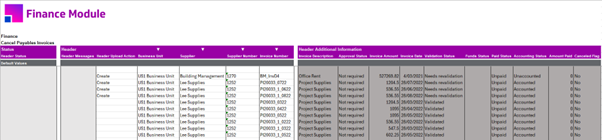
In the above example, the first four invoices are being cancelled.
Note the Create value in the corresponding Header Upload Action column.
The Lines sections are not required on the sheet when cancelling invoices.
Sheet Structure (Condensed) Examples - Invoices and Lines sections
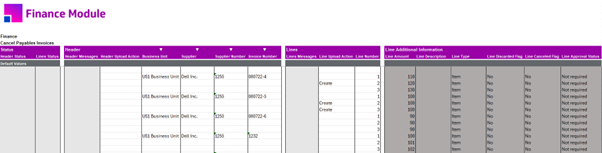
In the above example, line 2 is being cancelled on the first invoice, and lines 2 & 3 are being cancelled on the second invoice.
Note the Header Upload Action column is not populated, and the Line Upload Action has Create in the appropriate invoice line row.
The columns in the Header Additional Information section have been hidden in this example.
Statuses and Messages
Successful Invoice cancellations will display 'Accepted' in the Header Status column and the Lines Status column will not be populated if this section is in the template.
Successful Invoice Line cancellations will display 'Accepted' in the Line Staus column and 'Validated' in the Headers Status column.
If the Integrator rejects an upload during pre-validation, the errors will be displayed in the appropriate section*s Status and Messages columns.
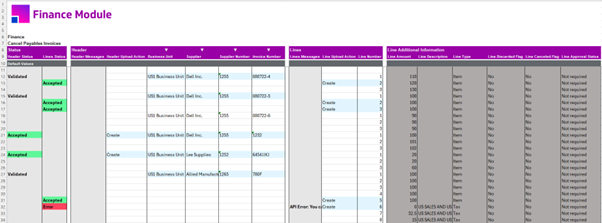
If the REST API rejects the uploaded data, the Payments Status column will display ‘Error’ and the Payments Messages column will contain the Oracle error prefixed with ‘API Error’, irrespective of which section the invalid data exists in.
-
The invoice on row 12 successfully had its second line cancelled.
-
The invoice on row 15 successfully had line 2 & 3 cancelled.
-
The invoice on row 18 had no action taken as neither upload action column was populated.
-
The invoices on rows 21 & 24 were successfully cancelled.
-
The invoice on row 27 successfully cancelled line 5, but failed to cancel line 6 as it is a tax line. The entire message in the Lines Messages column for this error is: API Error: You can’t perform this operation or action because this is a tax line. (AP-810720)
Downloading Options
Invoices and their lines can be downloaded into the template for simpler data entry using the Invoices download source. Please read Download Functionality to become familiar with the options.