Installation and User Guides

Finance Module

    • Welcome
    • Getting Started
      • Integrator Privileges
      • Enabling BI Report Downloads
      • Restriction of Integrators (Optional)
      • Logging In
      • Generating a New Sheet
      • Populating the Sheet
      • Upload Action Columns
    • Common Tasks
      • Ribbon Controls
      • Generating a New Sheet
      • Edit an Existing Sheet
      • Data Entry Forms
      • Formatting
        • Denormalize and Normalize
        • Sheet Ordering
      • Download
        • Download Via Form
        • Download Via Sheet
        • Download Sources
      • Default Row
      • Clearing Values
      • Descriptive Flexfields
        • Limitations
      • Key Flexfields
      • Validation
      • Upload
        • Upload Action Columns
        • Upload Selected
        • Upload All
        • Batching
      • Scheduled Processing
        • Submitting
        • Viewing
        • Refreshing
      • Attachments
      • Secondary Actions
      • Status and Message Columns
        • Correcting Errors and Reprocessing
        • SOAP Services
        • REST Services
      • Improving Performance
      • Diagnostics
      • Troubleshooting
    • Customers Integrator
      • Party and Customer Account Creation Process
      • Create Customer Records
      • Update Customer Records
      • Download Customer Records
      • Customers Integrator Limitations
    • Payables
      • Payables Invoices Integrator
        • Create Standard Payables Invoices
          • Payables Invoices Limitations
        • Download Purchase Orders
      • Holds and Releases Integrator
        • Apply Holds to Existing Invoices
        • Apply Releases to Existing Holds
        • Create Limitations
    • Receivables
      • Receivables Invoices Integrator
        • Create Receivables Invoices
        • Create Limitations
      • On-Account Credit Memos Integrator
        • Create On-Account Credit Memos
        • Apply On-Account Credit Memos to Invoices
          • Create On-Account Credit Memo and Apply
          • Use Existing On-Account Credit Memo and Apply
          • Descriptive Flexfields
          • Create Limitations
          • Apply Limitations
      • Receivables Receipts Integrator
        • Create Receipts
          • Miscellaneous Receipt Distributions
        • Apply Standard Receipts
        • Unapply Transactions
        • Update Manual Standard Receipts
        • Reverse Receipts
        • Adjust Receipts
        • Adjust Transactions
        • Download Options
        • Descriptive Flexfields
        • Receivables Receipts Limitations
    • Suppliers
      • Suppliers Integrator
        • Create Supplier Records
          • Assign Sites to New Addresses
          • Assign Sites to Existing Addresses
          • Assign Addresses to Contacts
        • Update Suppliers
          • Updating 'Supplier Name', 'Site Name' and 'Address Name'
          • Inactivating Contacts
        • Process Supplier Tax Information
        • Submitting Spend Authorization
        • Downloading Scenarios
        • Suppliers Limitations
      • Supplier Payment Details Integrator
        • Create Supplier Payment Detail Records
        • Update Supplier Payment Detail Records
        • Download Sources
        • Supplier Payment Details Limitations
      • Supplier Bank Accounts Integrator
        • Create Supplier Bank Account Records
        • Create Bank Account Owners
        • Bank Account Assignments
        • Update Bank Accounts
        • Download Bank Accounts
        • Supplier Bank Accounts Limitations
    • Fixed Assets
      • Asset Additions Integrator
        • Create Assets
        • Download Assets
        • Asset Additions Limitations
      • Asset Adjustments Integrator
        • Download Assets (for Adjustments)
        • Update Assets
        • Asset Adjustments Limitations
      • Asset Assignment Transfers Integrator
        • Download Assets (for Transfers)
        • Transfer Assets
        • Asset Assignment Transfers Limitations
      • Asset Retirements Integrator
        • Download Assets (for Retirements and Reinstatements)
        • Asset Retirements Limitations
    • General Ledger Journals Integrator
      • Create Journals
      • Upload Journals
      • Submit Journal Import Program
      • Error Handling
      • Download Journals
      • General Ledger Journals Limitations
    • Uploading
    • Error Handling and Validation
    • Performance
    • Support
    • Troubleshooting
Finance Module 19.1.4.0
  • More4apps ERP Cloud Documentation
  • Installation Guide
  • Finance Module
    • 19.1.4.0
  • Projects Module
    • 19.0.5.0
  • Procurement Module
    • 19.0.7.0
  • Product Definition Module
    • 19.0.3.0
  • Finance Module
  • Payables

Payables

The Payables functionality is broken down into multiple Payables Integrators:

  • Payables Invoices Integrator - for creating Payables Invoices and updating existing Payables Invoice Installments.

  • Holds and Releases Integrator - for applying and releasing holds on existing Payables Invoices.

Integrators related to Payables are grouped under the main heading Payables.
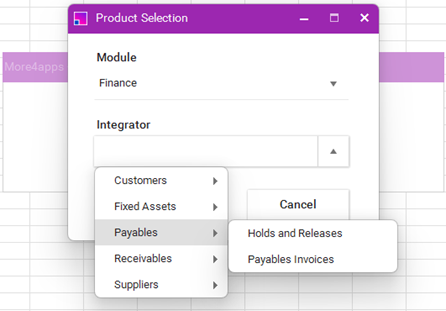
payablesIntegrators
Customers Integrator Limitations Payables Invoices Integrator