Profile Options
Profile Options with More4apps can disable and enable products and features across the suite. Once created they do need to be set against a user to take effect.
If you haven’t yet created your Profile Options, use the Admin Utility tool to quickly import them onto your instance. Alternatively, follow the manually creating profile options steps.
Below outlines all generic profile options. For any product specific profile options please refer to the products user guide for more information.
Restrict Access To Integrators
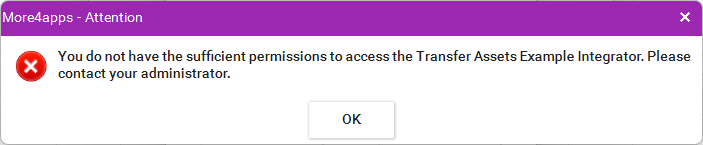
These Profiles Options prevent users from accessing specified Integrators within a Module. When configured, a user cannot perform any operations in that designated Integrator
| Profile Option Name | Profile Option Code | Value | Description |
|---|---|---|---|
Exclude More4apps <Example> Integrator |
|
Y |
Restricts user access to the Integrator. |
N or Blank (Default) |
No restrictions. |
| Where <Example> is used this will be replaced with the Integrator name. For exact syntax refer to the product user guide for restricting Integrator access. |
Module specific Restriction Profiles can be found here:
Enabling BI Report Downloads
Some Integrators use a BI Report download instead of the standard download function, as there is no suitable Oracle Web Service available.
Because of this, a profile option must be created and configured for the BI Report download to work. While BI Report downloads respect some Oracle security settings, they do not cover all of them, so the profile option is required.
| Profile Option Name | Profile Option Code | Value | Description |
|---|---|---|---|
Enable More4apps <Example> Primary Download Report |
|
Y |
Enables BI report download for the Integrator. |
N or Blank (Default) |
Disables the Download for the Integrator. |
| Where 'Example' is used this will be replaced with the Integrator name. For exact syntax refer to the product user guide for Enabling BI Report Downloads. |
Module specific BI Report Profiles can be found here:
Disable Creating and Editing Sheets
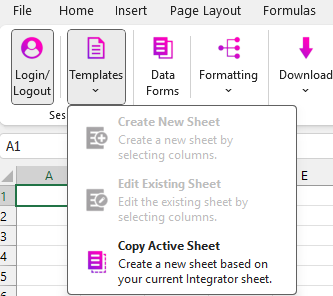
This profile restricts users from Creating and Editing existing templates. This is particularly useful when sending out cut down templates for users to perform their tasks. Using this in conjunction with the Sheet Protection will fully lock down your templates.
When using this configuration it will disable both the Create and Edit Template buttons in the ribbon.
| This functionality is application wide. |
| Profile Option Name | Profile Option Code | Value | Description |
|---|---|---|---|
Disable More4apps Create and Edit Template options |
|
Y |
Will disable the Create and Edit sheets ribbon options. |
N or Blank (Default) |
No restrictions |