Installation and User Guides

Product Definition Module

    • Welcome
    • Getting Started
      • Integrator Privileges
      • Restriction of Integrators (Optional)
      • Logging In
      • Generating a New Sheet
      • Populating the Sheet
      • Upload Action Columns
    • Common Tasks
      • Ribbon Controls
      • Generating a New Sheet
      • Edit an Existing Sheet
      • Data Entry Forms
      • Formatting
        • Denormalize and Normalize
        • Sheet Ordering
      • Download
        • Download Via Form
        • Download Via Sheet
        • Download Sources
      • Default Row
      • Clearing Values
      • Descriptive Flexfields
        • Limitations
      • Key Flexfields
      • Validation
      • Upload
        • Upload Action Columns
        • Upload Selected
        • Upload All
        • Batching
      • Scheduled Processing
        • Submitting
        • Viewing
        • Refreshing
      • Attachments
      • Secondary Actions
      • Status and Message Columns
        • Correcting Errors and Reprocessing
        • SOAP Services
        • REST Services
      • Improving Performance
      • Diagnostics
      • Troubleshooting
    • Items Integrator
      • Create Item Information
        • Copy from Item Creation
        • Create Limitations
      • Update Existing Item Information
        • Column Update Restrictions
        • What columns are needed?
        • Update Limitations
    • Item Structures Integrator
      • Create Item Structure Information
      • Create Limitations
      • Download Sources
      • Update Item Structures
        • What columns are needed?
        • Update Limitations
    • Item Relationships Integrator
      • Related Items
        • Create Related Items
        • Update Related Items
        • Delete Related Items
        • Download Related Items
        • Related Items Limitations
      • GTIN Items
        • Create GTIN Items
        • Update GTIN Items
        • Delete GTIN Items
        • Download GTIN Items
        • GTIN Items Limitations
      • Cross Reference Items
        • Create Cross Reference Items
        • Update Cross Reference Items
        • Delete Cross Reference Items
        • Download Cross Reference Items
        • Cross Reference Items Limitations
      • Trading Partner Items
        • Create Trading Partner Items
        • Update Trading Partner Items
        • Delete Trading Partner Items
        • Download Trading Partner Items
        • Trading Partner Items Limitations
      • Spoke System Items
        • Create Spoke System Items
        • Update Spoke System Items
        • Delete Spoke System Items
        • Download Spoke System Items
        • Spoke System Items Limitations
    • Descriptive Flexfields
    • Uploading
    • Error Handling
    • Performance
    • Support
    • Troubleshooting
Product Definition Module 19.0.3.0
  • More4apps ERP Cloud Documentation
  • Installation Guide
  • Finance Module
    • 19.1.4.0
  • Projects Module
    • 19.0.5.0
  • Procurement Module
    • 19.0.7.0
  • Product Definition Module
    • 19.0.3.0
  • Product Definition Module
  • Support

Support

Refer to the troubleshooting section in this document. If you still need further assistance, please raise a support ticket though our helpdesk portal. Click on the icon ‘Help’ on the More4apps toolbar for help options.
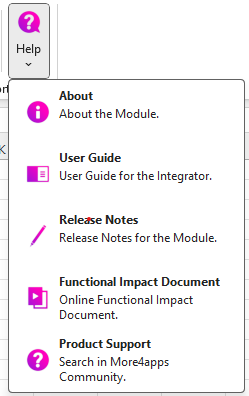
helpbutton

Performance Troubleshooting