Restrict Creating & Editing Sheets
You can restrict users from Creating new sheets and Editing existing sheets. This is particularly useful when sending out cut down templates for users to perform their tasks. Using this in conjunction with the Sheet Protection functionality will fully lock down your templates.
When using this configuration it will disable both the Create and Edit Template buttons in the ribbon.
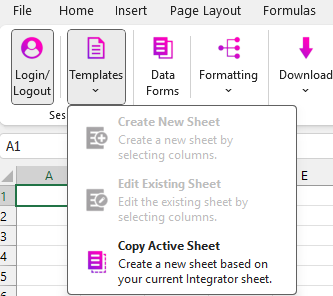
| This functionality is application wide. |
Profile Creation
-
Navigate to Setup and Maintenance from the Oracle Homepage.
-
Search for and select the Manage Profile Options task.
-
Click the + under the Profile Options section.
-
Populate the fields as specified:
-
Profile Option Code: M4A_DISABLE_TEMPLATE_CREATE_EDIT_OPTIONS
-
Profile Display Name: Disable More4apps Create and Edit Template options
-
Application: Applications Common Components
-
Module: Common CRM
-
Start Date: Specify the date you wish the profile to be active from.
-
-
Click Save and Close
-
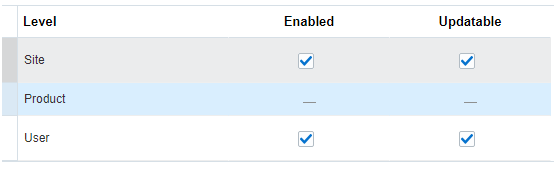
In the Profile Option Levels section, select the checkboxes for the levels you want to enable (Site and/or User). Make sure both Enabled and Updatable are checked for the levels you require.
-
Click Save and Close
Adding Values
-
Navigate to the Setup and Maintenance screen.
-
Search for and select the Manage Administrator Profile Values task.
-
Search for the Profile Option you created in the Setup section.
-
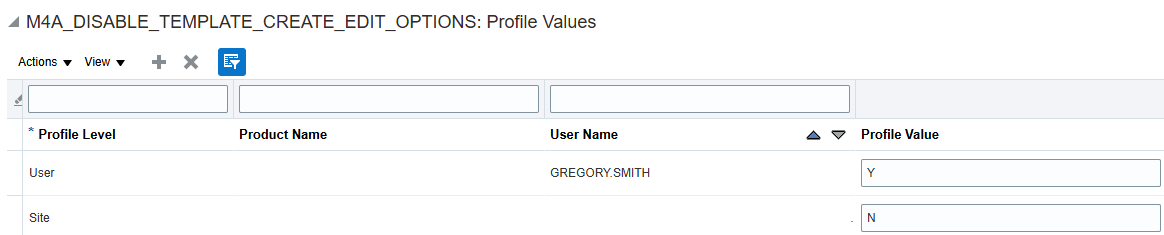
Under the Profile Values section click the + and then add your user or site values.
-
Y: Will disable the Create and Edit Sheet buttons.
-
N or Blank: Will enable the Create and Edit Sheet ribbon buttons.
-
-
Click Save and Close.
If the profile has not been created, all Sheet related ribbon buttons will be enabled by default.